Baselineby Auxetic
For firms that quote a BOQ plus services

Price every job with the margin you meant.

A free Excel quoting workbook that sets margin on every line, builds the customer quote for you, and checks itself before you send it. When the job is won, Baseline Pro tracks that margin until the job is done.

  • AV & security integrators
  • M&E & electrical
  • Interior fit-out
  • Engineering & fabrication
  • Any BOQ + services trade
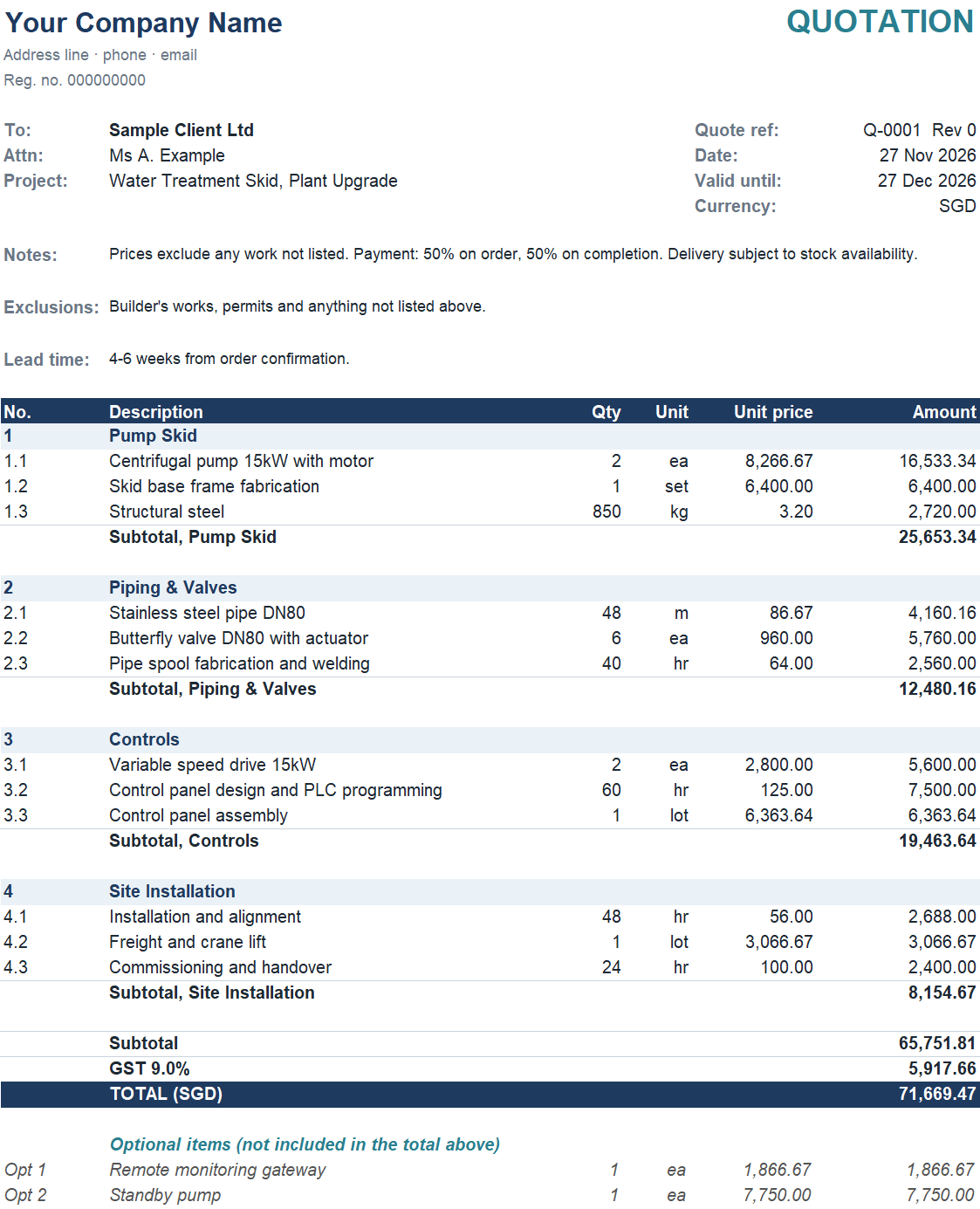
A customer quotation built automatically by the workbook: grouped, numbered lines with subtotals, GST, total and optional items.
Why jobs lose money

Profit is usually lost quietly, and found out late.

01

One margin for the whole job

A blanket percentage hides the lines that earn nothing. You only find them when the job is already won.

02

Changes priced late, or never

Variations get done before they're priced, approved changes never reach the invoice, and rejected ones are forgotten.

03

The overrun shows up at close-out

Price rises, extra hours and subcontract overruns pile up across POs, timesheets and invoices. Nobody adds them up until it's too late to act.

Free workbook

A quote you can trust before it goes out.

  • Margin on every line. See which items make money and which don't, before the client sees a price.
  • The quote builds itself. Type lines in any order; the customer quote is grouped, numbered, subtotalled and taxed. Cost and margin never appear on it.
  • Itemised or lump sum. Print unit prices, hide them, or show one price per area with the lines as scope.
  • It checks itself. Missing quantities, forgotten costs and lines below your minimum margin are flagged before you send.
  • Optional items, done properly. Price upgrades and alternatives without breaking the total.
  • Speaks your trade. Pick your industry and the line types, units and group names change to match.
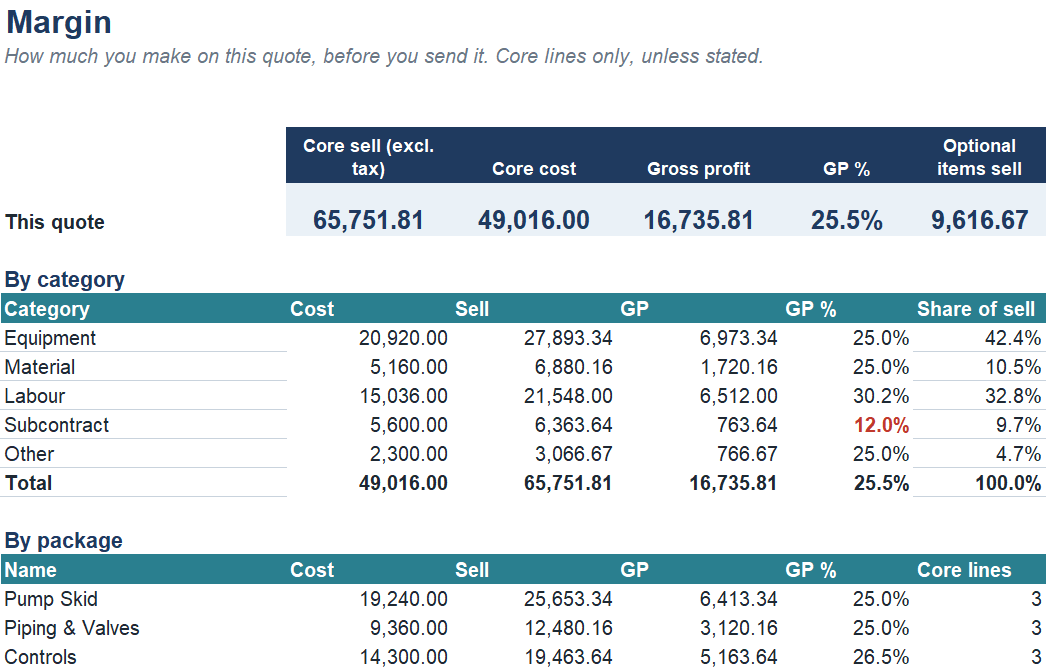
Margin summary by category, with low-margin lines in red and a cost versus sell chart.
Free download

Get the free quoting workbook.

Excel, no macros, no sign-in. Pick your industry and it arrives set up for your trade, with a worked sample job and a two-minute guide.

We'll email you the download link. Unsubscribe any time; we never share your address.

Works in Microsoft Excel and opens in Google Sheets.

On its way.

Check your inbox for the link. You can also download it right now:

Download the workbook

Baseline Pro Early access

Keep the margin you priced in, from signed quote to final claim.

Pro takes the quote the client signs as the budget, then follows every order, delivery, timesheet, change order and progress claim against it, across all your projects.

  • The signed quote becomes the baseline. Every later change is measured against it. Every revision stays on record.
  • An honest forecast. Labour is projected at the rate you're actually achieving. Orders count the day you place them, so an overrun shows while you can still act.
  • Purchasing and stock. POs in any currency, printable POs, part deliveries, stock that updates itself, and price rises flagged against the budget line.
  • Change orders. Requested, approved, rejected: none forgotten, none unbilled.
  • Progress claims and retention. Unbilled work, what the client owes you, and whether each job is funding itself.
  • The Monday view. Every live project on one page, red, amber or green.
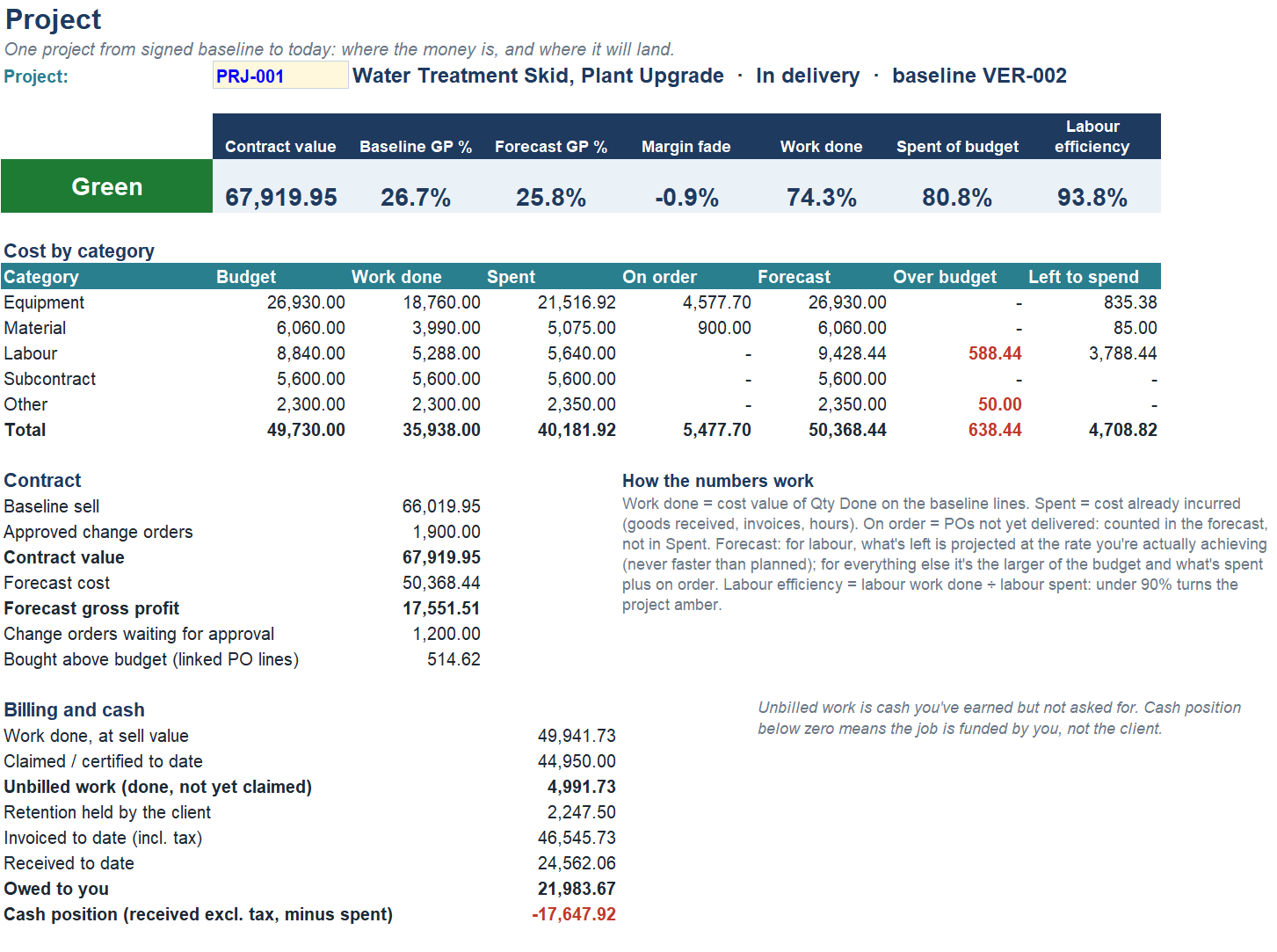
Pro project dashboard: contract value, baseline versus forecast margin, cost by category with overruns in red, and a billing and cash summary.
Pro portfolio view listing every project with forecast margin, fade, work done, spend, labour efficiency, unbilled work and a red/amber/green flag.

Sample data shown is fictional. Pro is in early access: tick the box when you download the free workbook and we'll tell you when it's available.

What you getFreePro
BOQ with margin on every line, auto-built customer quote, self-checks✓✓
Industry presets, optional items, itemised or lump-sum quotes✓✓
Many projects in one workbook, revisions, product catalogue—✓
Signed quote locked as the baseline budget—✓
Purchase orders (any currency), deliveries, calculated stock—✓
Timesheets, invoices, change orders—✓
Forecast final margin per project, red/amber/green—✓
Progress claims, retention, unbilled work and cash position—✓
Questions

Good to know

Which Excel do I need?

The free workbook works in any recent version of Microsoft Excel. It also opens in Google Sheets, where everything calculates; a few buttons and print settings are Excel-only.

Does it use macros?

No. There are no macros, so you won't see security warnings, and it works on any computer your team uses.

Where is my data stored?

In the file on your own computer or drive. Nothing is uploaded anywhere; the workbook doesn't connect to the internet.

Is it really free?

Yes. The free workbook is yours to keep and use on real jobs. We ask for your email to send the link, and to tell you about Baseline Pro if you ticked the box.

Is there support?

The workbook explains itself: a two-minute guide, a worked sample job, and checks that tell you what to fix. There's no onboarding or support desk, which is part of why it's free.

My trade isn't listed.

Choose "General". If you quote a list of materials and equipment plus labour or services, the workbook fits. You can rename groups, line types and units to suit.